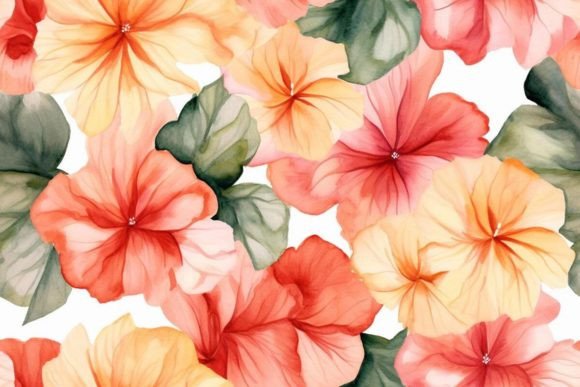
Seamless Patterns Product Design: Avoiding Common Pitfalls for Better Results
You are likely here because you want to elevate your visual projects, whether that means creating a stunning website background, designing packaging for a new product line, or preparing assets for a print-on-demand business. Seamless Patterns Product Design is the backbone of many successful commercial graphics, yet it is also a field where subtle errors can lead to significant headaches later on. Many creators rush into downloading assets without understanding the technical nuances, only to find their designs looking pixelated, misaligned, or legally restricted when they go to use them.
The reality is that not all pattern files are created equal. A file might look perfect in a preview window but fail miserably when scaled up for a large banner or down for a mobile app icon. Before you commit to a specific asset pack or start building your own library, it is crucial to understand what makes a pattern truly seamless and how to evaluate the quality of the files you are about to integrate into your workflow.
The Hidden Traps in Pattern Downloads
One of the most frequent misunderstandings involves the relationship between file resolution and usage. When browsing through collections, it is tempting to grab the first option that looks visually appealing. However, the file size and dimensions listed in the download summary often tell a different story. If a design is labeled as a "JPG file" with low resolution, it will immediately suffer from pixelation when stretched beyond its original dimensions. This is particularly dangerous for entrepreneurs who plan to scale their designs for various marketing materials.
Consider the scenario where a freelancer downloads a pattern to create a custom fabric print. If the source image lacks sufficient detail or has been compressed too heavily, the final print will look blurry and unprofessional. This directly impacts client satisfaction and can damage your reputation as a designer. Always verify the intended output before clicking download. Ask yourself: Will this be used for web screens, large format printing, or high-resolution merchandise? The answer dictates the minimum requirements for your file selection.
Navigating Misleading Metadata
Another critical area where users often stumble is in the metadata and titles provided by stock libraries or independent sellers. As noted in many product descriptions, titles can be randomly generated and may be misleading. You might see a title suggesting a "Vintage Floral Vector," only to discover upon opening the ZIP folder that the content is actually a rasterized JPG. This discrepancy forces you to waste time converting formats or, worse, using a low-quality raster image where a vector was expected.
To avoid this frustration, focus strictly on the actual image previews rather than relying on text descriptions. Look at the thumbnails closely. Do the edges align perfectly? Is there any visible tiling error? If the preview shows a hard line where the pattern repeats, the seam is not truly seamless. A true seamless pattern should repeat infinitely without showing any breaks or shifts in the design flow. Ignoring this visual check can result in awkward gaps that ruin the aesthetic of your entire project.
Evaluating File Formats and Usability
The distinction between JPG files and other formats like PNG or AI (Adobe Illustrator) is vital for professional work. While the prompt mentions receiving a JPG file, relying solely on JPEGs for product design can limit your flexibility. JPGs use lossy compression, meaning every time you save the file, you lose a bit of quality. Furthermore, they do not support transparency, which restricts how you can layer the pattern over other elements.
If you are working on a product mockup where the pattern needs to sit behind a logo or a specific shape, a transparent background is essential. Using a JPG often requires you to manually remove the background, which can leave jagged white edges or artifacts around intricate details. For maximum efficiency and quality, always check if a higher-quality version, such as a PNG or vector file, is available. If you must use a JPG, ensure it is saved at the highest possible quality setting to minimize compression artifacts.
The Importance of Tiling Logic
A common mistake in applying these designs is failing to test the tile logic before committing to a full-scale project. Even if a pattern looks seamless in a small preview, stretching it across a large canvas can reveal repeating artifacts that were invisible at a smaller scale. This is known as the "grid effect." It happens when the pattern's internal structure creates a visible grid when repeated, making the design look artificial and manufactured rather than organic.
To prevent this, take the time to duplicate the pattern multiple times horizontally and vertically within your design software. Inspect the junction points where the images meet. Are the colors blending naturally? Do the shapes connect smoothly? If you spot a harsh line or a color shift, the pattern is flawed. Investing time in this verification step now saves hours of rework later. It ensures that your final presentation communicates professionalism and attention to detail.
Practical Steps for Better Selection
When evaluating a Seamless Patterns Product Design package, adopt a checklist approach to filter out subpar options. First, check the file integrity. Open the ZIP file and inspect the actual image dimensions. Does the width and height match the requirements for your project? Second, analyze the visual continuity. Zoom in to 100% and look for pixelation or blurriness. Third, consider the versatility. Can this pattern work in both light and dark themes? Does it complement a variety of color palettes?
It is also wise to read the comments section of the product listing. Often, other users will highlight specific issues, such as missing layers or incorrect file names. These real-world experiences provide valuable insights that the official description might omit. If a seller encourages feedback, it usually indicates a commitment to quality and customer support. Engaging with the community can help you identify patterns that have been tested and proven to work well in real-world scenarios.
- Check Resolution: Ensure the image is large enough for your intended use case.
- Verify Format: Prefer PNG or Vector over JPG for better editing capabilities.
- Test the Tile: Create a large canvas to check for visible seams or repeating grids.
- Read Reviews: Look for user feedback regarding file accuracy and quality.
Moving Forward with Confidence
Ultimately, the goal of using Seamless Patterns Product Design is to enhance your creative output without introducing unnecessary complications. By avoiding the common pitfalls of poor resolution, misleading titles, and incompatible file formats, you can streamline your workflow and produce higher-quality results. Remember that the best asset is not necessarily the one with the flashiest title, but the one that fits your technical requirements perfectly.
Take the time to evaluate your choices carefully. If a product seems too good to be true or lacks clear specifications, it is better to skip it and search for a more reliable alternative. Your future self will thank you for the extra diligence spent during the selection process. With the right approach, you can build a library of patterns that serves as a solid foundation for all your creative endeavors.